5 Hidden Features of the Razer Kishi V3 Pro Xl Ipad Controller You Must Know About
The landscape of mobile gaming has undergone a seismic shift in recent years. What was once the domain of casual puzzle games and simplified runner-style mechanics has evolved into a powerhouse industry capable of delivering AAA experiences. Much of this evolution is thanks to the increasing power of tablet hardware, specifically the Apple iPad. However, despite the incredible benchmarks of M-series chips, the bottleneck for serious gamers has always been the interface. Touchscreens, while innovative for navigation, simply cannot replicate the tactile precision required for competitive shooters, soul-like RPGs, or precision platformers. Enter the Razer Kishi V3 Pro XL iPad Controller—a device that doesn't just bridge the gap but arguably sets a new standard for handheld ergonomic performance.
While many users are familiar with the basic concept of a bridge-style controller—plugging it into the USB-C port and snapping the tablet into place—the V3 Pro XL is a far more sophisticated piece of engineering than its predecessors. It is designed to accommodate the larger dimensions of the iPad Pro and Air models, effectively turning a slim productivity tablet into a gaming console that rivals the Nintendo Switch or Steam Deck in terms of screen real estate and exceeds them in raw graphical potential. Beyond the obvious aesthetic and basic functional design, there are several nuances and hidden functionalities that often escape the average user. Understanding these features is essential for those who want to maximize their investment and truly optimize their mobile gaming rig.
Detailed Product Analysis: The Professional Edge
The Razer Kishi V3 Pro XL is not a toy; it is a professional-grade peripheral aimed at a demographic that takes cloud gaming, remote play, and native iPadOS titles seriously. At its core, the device utilizes a stable, direct USB-C connection. This is a critical distinction from Bluetooth-based controllers. By bypassing wireless protocols, Razer eliminates input latency—the microscopic delay between pressing a button and seeing the action on screen. In high-stakes environments like Genshin Impact or Call of Duty: Warzone Mobile, these milliseconds are the difference between victory and defeat.
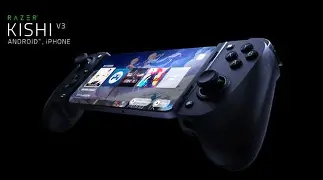
The build quality is noticeably premium. The bridge mechanism, which expands to hold the tablet, uses a reinforced internal spine that minimizes flexing. This is a common complaint with cheaper controllers where the weight of a larger iPad can cause the entire setup to feel "creaky" or unstable. The V3 Pro XL maintains a rigid structure, giving the user the sensation of holding a single, unified device rather than a tablet sandwiched between two plastic grips. The button layout follows the industry-standard ABXY configuration, but with Razer’s proprietary microswitch technology, providing a clicky, tactile feedback that informs the player exactly when an input has been registered.
Furthermore, the inclusion of Hall Effect triggers is a significant upgrade. Unlike traditional potentiometers that use physical contact to measure the pull of a trigger—eventually wearing out over time—Hall Effect sensors use magnets. This leads to frictionless movement, extreme durability, and, most importantly, precise analog input. This is particularly noticeable in racing games where minute graduations in throttle or braking are required to navigate tight corners efficiently.
5 Hidden Features You Must Know About
While the marketing material highlights the ergonomics and the USB-C connectivity, several deeper features make the Kishi V3 Pro XL a powerhouse for power users.
1. Advanced Haptic Customization via Nexus
Most mobile controllers offer a simple binary vibrate-or-not functionality. The Kishi V3 Pro XL, however, integrates Razer’s HyperSense Haptics. When many users first plug the device in, they might find the haptics either too subtle or too aggressive. The "hidden" power lies within the Razer Nexus App. Many users treat this app as a simple game launcher, but it contains a deep dive into haptic frequency mapping. You can actually adjust the intensity of haptic feedback based on the audio output of the game. This means that a grenade explosion in a shooter can feel distinct from the low rumble of a car engine. By fine-tuning these settings, you transform the controller from a silent input device into an immersive sensory tool that provides physical context to the digital action.
Find top-rated Electronics products at great prices.
View Offers →2. The Passthrough Charging Intelligence
While passthrough charging is a listed feature, the "hidden" aspect is how the Kishi V3 Pro XL manages power delivery. Traditional passthrough ports on mobile controllers often charge at a very low wattage, sometimes barely keeping the battery level stable while gaming. The V3 Pro XL supports fast-charging protocols. If you use a high-wattage iPad charger (such as the 30W or 35W bricks), the controller intelligently routes power to the iPad first to ensure it stays topped up even under heavy GPU load, while also powering the controller’s internal haptic motors and microswitches. This allows for marathon gaming sessions without the fear of thermal throttling caused by inefficient power management.
3. Modular Insert System for Case Compatibility
One of the biggest frustrations with bridge controllers is the "naked tablet" requirement. Most controllers require you to strip your iPad of its protective case. Razer has implemented a subtle, modular rubber insert system in the V3 Pro XL. These inserts are removable and interchangeable. Many users don't realize that by removing these silicon pads, you can often fit an iPad with a slim-profile skin or a very thin case. This prevents the constant friction and potential scratching that comes from repeatedly taking a tablet in and out of a rugged case just to play a game for twenty minutes. It’s a small design detail that speaks to the long-term health of the user's tablet.
4. Rebindable Multi-Function Buttons (M1/M2)
On the shoulders of the controller, tucked just inside the bumpers, are two additional multi-function buttons labeled M1 and M2. In their default state, they may do nothing in certain games. The hidden utility here is the ability to remap these buttons to any other face button or trigger. This is a game-changer for complex titles. For example, in a game that requires you to take your thumb off the right analog stick to jump or reload (the "claw" grip problem), you can simply map those actions to M1 and M2. This allows you to keep full control over your camera and movement while performing secondary actions, effectively giving you the same competitive advantage as a "Pro" console controller like the Xbox Elite or PlayStation DualSense Edge.
5. Virtual Controller Mode for Touch-Only Games
This is perhaps the most powerful hidden feature. There are many games on the App Store that are fantastic but lack native controller support. Usually, this would render a physical controller useless. However, via the Nexus software, the Kishi V3 Pro XL supports a Virtual Controller Mode (screen mapping). This allows you to overlay physical button presses onto specific areas of the touchscreen. You can map the left joystick to the on-screen movement pad and the buttons to the on-screen skill icons. While it takes a few minutes to configure for each game, it opens up a massive library of titles—including many popular MOBA and Battle Royale games—that were previously touch-only, giving you a massive tactical advantage over players relying on their fingers.
Pros & Cons
- Pro: Zero Input Latency – The direct USB-C connection ensures that your inputs are instantaneous, providing a console-quality experience on a mobile platform.
- Pro: Ergonomic Excellence – The XL grips are designed for adult hands, preventing the cramping that often occurs with smaller, more portable controllers.
- Pro: Hall Effect Technology – Magnetic sensors in the triggers provide longevity and precision that mechanical parts simply cannot match.
- Pro: Expandable Design – Its ability to fit the largest iPads makes it future-proof as screen sizes continue to push the boundaries of what a "tablet" can be.
- Pro: Integrated Audio – The inclusion of a 3.5mm headphone jack is a godsend for gamers who prefer wired audio for zero-latency sound or who use high-end IEMs.
- Con: Size and Portability – Because it is designed for the "XL" experience, it is significantly bulkier than standard mobile controllers, making it less pocketable.
- Con: App Dependency – To unlock the full suite of customization (haptics, button remapping, and screen mapping), you must use the Razer Nexus app, which some users may find intrusive.
- Con: Aesthetics – The industrial, black plastic look may clash with the sleek, minimalist aesthetic of the iPad Pro for some users.
Comparison: Kishi V3 Pro XL vs. Competition
To understand where the Kishi V3 Pro XL stands in the market, it is helpful to compare it against the standard mobile controller offerings and the DIY "Clip" method (using a console controller with a tablet stand).
| Feature | Razer Kishi V3 Pro XL | Standard Bridge Controllers | Console Controller + Clip |
|---|---|---|---|
| Connection Type | USB-C (Wired) | Bluetooth or USB-C | Bluetooth |
| Latency | Lowest (Zero) | Variable | Higher (Wireless) |
| Weight Balance | Excellent (Center-weighted) | Good | Poor (Top-heavy) |
| Trigger Type | Hall Effect (Magnetic) | Mechanical/Resistive | Varies (Resistive) |
| Tablet Max Size | Up to 13-inch iPad Pro | Usually up to 7-8 inch smartphones | Universal (but awkward) |
| Software Support | Deep (Nexus App) | Minimal | None (Native OS only) |
Buying Guide: Is the XL Right for You?
When considering the Razer Kishi V3 Pro XL, potential buyers should evaluate their specific use cases. This is not a "one size fits all" accessory. It is a specialized tool for a specific type of gamer.
Identify Your Device
First and foremost, check your hardware. The "XL" in the name is literal. While it can hold smaller devices, it is optimized for the iPad Mini, iPad Air, and the large iPad Pro models. If you are primarily a smartphone gamer, the standard Razer Kishi V3 or the V2 Pro may be more appropriate and more portable. However, if you find that playing on a phone screen is too cramped for detailed RPGs or tactical maps, the transition to an iPad with the V3 Pro XL is a revelation.
Find top-rated Electronics products at great prices.
Shop Amazon →Consider Your Library
Are you playing native iPadOS games, or are you a subscriber to cloud services? If you use Xbox Cloud Gaming (xCloud), NVIDIA GeForce NOW, or PlayStation Remote Play, the Kishi V3 Pro XL is perhaps the best way to experience these services. The 12.9-inch or 13-inch iPad screens provide a 1:1 aspect ratio that feels incredible for cloud streaming, and the controller's layout perfectly mimics the input requirements of these console-based services.
Ergonomics vs. Portability
Think about where you play. If you game mostly on your couch, in bed, or during long flights/train rides, the bulk of the V3 Pro XL is a non-issue. The comfort it provides during long sessions outweighs its footprint. However, if you are looking for something to pull out of a pocket during a five-minute bus ride, the size of the XL may be a hindrance. This is a "dedicated session" controller, meant for those who want to get lost in a game for hours.
The Value of Customization
If you are a casual player who just wants to jump in and press "start," you might not need the Pro XL. But if you value the ability to change your trigger dead-zones, adjust haptic curves, and remap buttons to fit your specific playstyle, the "Pro" features are worth the premium. The Hall Effect triggers alone provide a level of durability that ensures you won't be looking for a replacement controller in twelve months due to stick drift or trigger failure.
Conclusion
The Razer Kishi V3 Pro XL represents the pinnacle of current mobile gaming peripherals. It takes the iPad—the world's most powerful tablet—and enfinishes the transformation into a world-class gaming machine. By focusing on the details that professional and enthusiast gamers care about, such as zero-latency wired connections, Hall Effect precision, and deep software integration, Razer has created a device that feels like a necessity rather than an optional add-on.
Beyond the surface-level specs, the hidden features like Virtual Controller Mode and the modular insert system show a level of thoughtfulness regarding the reality of mobile gaming. It addresses the issues of game compatibility and hardware protection that often plague the category. While its size and price point position it as a premium product, the sheer quality of the experience it facilitates makes it a compelling choice for anyone serious about taking their iPad gaming to the next level. Whether you are raiding in an MMO, competing in a high-speed racer, or streaming a blockbuster title from the cloud, the Kishi V3 Pro XL provides the control, comfort, and customization required to play at your best.